
athenaPatient
athenahealthMedical
4.85.09K Reviews
- Version
- 1.25.9
- Installs
- 1.00M
- Age Rating
- Everyone
Screenshots
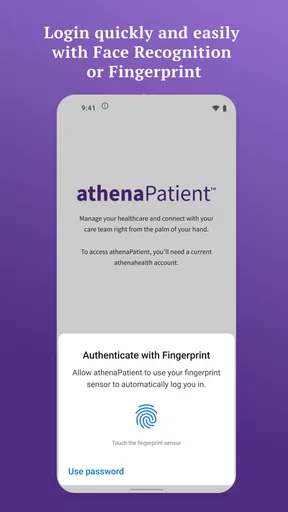
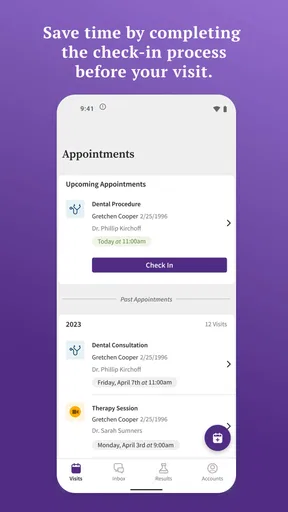
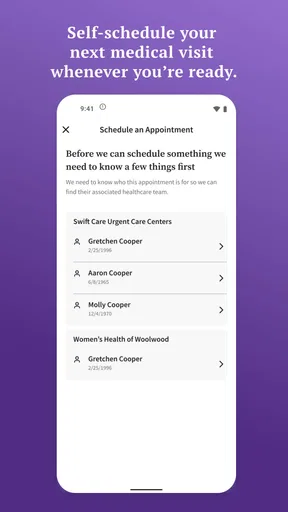
Our Review of athenaPatient
 Analysis by Appyee
When I rely on a patient app, the real test is what happens when I need a detail at an inconvenient moment: while travelling to an appointment, checking a result between tasks, or trying to send a quick question without calling the office. athenaPatient is a medical app from athenahealth that brings patient-facing health information and care-team communication together. I see its main value as a practical connection to participating care, rather than as a replacement for a clinician or a universal home for every medical record.
Where a connection makes the difference
The most useful moments depend on being able to reach the information and services connected to your care. Looking up an appointment or a record is only convenient if the app can retrieve the relevant information when you need it. Messaging is similar: it can save a call for a non-urgent question, but it is not a sensible route for an emergency or for an issue that needs immediate clinical attention. I would keep the care team’s usual urgent contact instructions available rather than assuming an app message will be seen straight away.
That distinction matters when deciding what to put in a message. A concise note about a routine follow-up is a better fit than a complicated symptom description that needs an immediate response. I’d include the main question and any detail the clinician needs to understand it, then use the appropriate phone or emergency service if the situation cannot wait. This makes the app a useful communication channel without mistaking convenience for round-the-clock medical care.
Useful in the small gaps of the day
A patient portal earns its place less through dramatic moments than through brief, ordinary checks. Before leaving for an appointment, I’d use it to review what is scheduled and make sure I know which care team I’m seeing. After a visit, having relevant health information accessible on a phone can be more convenient than searching through email, paper notes, and separate apps. The practical benefit is fewer little errands to remember, not a promise that every part of healthcare happens on a screen.
For someone helping a family member, the useful workflow is to check what access and account arrangements the provider supports before relying on the app to manage another person’s care. That is especially important when the patient is a child, an older relative, or someone who cannot handle account tasks alone. I would not assume that installing the app automatically gives a caregiver permission to view someone else’s information; access should follow the provider’s process and the patient’s consent.
It can also help to treat a phone check as preparation rather than a substitute for a visit. If I notice a question while reviewing information, I can write it down and raise it with the care team through an appropriate channel. For a scheduled appointment, checking details before setting off is more useful than waiting until I am already at the clinic door and trying to solve a connectivity problem in a hurry.
What it can and cannot replace
Compared with calling a clinic for every routine query, a portal can make straightforward communication less disruptive. Compared with a general health-tracking app, its value is its connection to care-team information rather than simply collecting personal wellness notes. Those are different jobs. Someone who wants to log exercise, diet, or symptoms across unrelated providers may still prefer a dedicated tracker, while a person whose provider supports this portal may find it more relevant for care-related tasks.
The trade-off is that a provider-linked app is only as useful as the connection between the patient and that provider. It should not be treated as a guaranteed, all-in-one record of care from every organization a person has visited. If a provider is not part of the relevant network, or if the needed record is not available through the account, the app may not remove the need to contact that office or use its own patient system. I’d check with the practice before making it the only place I look for important information.
Connectivity also affects when I would choose an alternative. If I need immediate clinical guidance, calling the care team or using emergency services is more appropriate than waiting for an in-app exchange. If I need a document from a provider that does not connect to the account, that provider’s own portal or office may be the quicker route. The app is strongest as a convenient bridge to participating care, not as a universal workaround for every healthcare task.
Recovering from a frustrating moment
Even a well-designed app can be inconvenient when a login does not work, a page takes time to load, or a record is not where I expected it. My first step would be to check whether the phone has a usable connection, then reopen the app and try again. If a task is time-sensitive, I would contact the provider through its established phone channel instead of repeatedly retrying and hoping the screen changes. For an appointment, keeping the clinic’s contact details somewhere accessible can prevent a small app issue from becoming a missed-care problem.
If information appears incomplete, I would avoid assuming it has been lost or that the app itself can correct the underlying record. The care office is the right place to ask whether the information is available to the account and how an error should be fixed. That is a helpful distinction: an app can make records easier to reach, but the provider remains the authority for clinical corrections and questions about the chart.
Notifications can be useful reminders, but I would still make a personal plan for important appointments or medication routines rather than relying on a single phone alert. A calendar entry or another reminder method can serve as a backup. This is not because the app is necessarily unreliable; it is simply a sensible way to handle tasks where forgetting has consequences.
Privacy and sensible habits
Health information deserves more care than an ordinary shopping or entertainment account. I’d use a device passcode, avoid leaving a shared phone unlocked, and sign out or secure the device when other people can access it. If a phone is lost or shared within a household, those basic habits matter as much as the convenience of having records close at hand. I would also check the account and access options offered by the provider before letting another person use my login.
For data-conscious use, I’d open the app when I have a specific task in mind—checking an appointment, reviewing information, or contacting the care team—rather than repeatedly refreshing it. That is a practical way to limit unnecessary mobile use and avoid depending on a connection in places where service is poor. If I expect to need a detail during a trip, I would check it before leaving, rather than assuming it will be available at every stop.
Who is likely to get the most from it
I think this is most worthwhile for patients whose care is connected to athenahealth and who want a convenient mobile route to routine account tasks. It is a good fit for someone who checks appointments on the move, prefers sending a non-urgent question over making a quick call, or wants to keep relevant care information easier to reach. It may also suit people who are comfortable using a phone for practical healthcare administration but still want conversations and decisions to remain with their clinicians.
I would be more cautious if a person expects one app to combine every provider, or needs a tool for intensive personal health tracking. It may also be a poor fit for someone who has unreliable internet access and frequently needs records away from home, or who finds account-based apps harder than calling the clinic. In those cases, paper notes, a provider’s direct contact route, or a separate tracking tool may be more dependable for the particular task.
Before making it part of a routine, I’d ask the practice whether it uses the portal and which kinds of information and communication are available through the patient account. That simple check answers a key practical question: whether the app connects to the care a person actually receives. It is also worth confirming how the office wants patients to handle urgent questions, because a portal message and an urgent call are not interchangeable.
In everyday use, a realistic scenario might be checking an appointment while getting ready to leave, noticing a question about the visit, and sending it to the care team if it is routine. If the response is needed immediately, I would switch to a phone call instead of waiting on an app message. That small change in approach makes the tool more useful: it handles convenient administrative communication, while urgent needs stay on a faster route.
Getting Started with athenaPatient
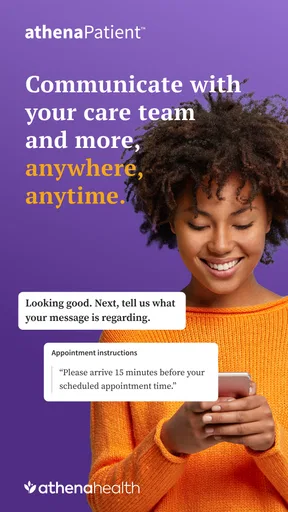
First things first, downloading and setting up athenaPatient is a breeze. Available for both Android and iOS, the app doesn’t bog you down with endless forms and details. Instead, it simplifies the process with a straightforward sign-up and an intuitive interface that even the least tech-savvy among us can navigate.
User Interface and Experience
Upon launching the app, you’re greeted with a clean and uncluttered interface. The developers have done a stellar job ensuring the app is easy to use. The home screen provides quick access to your appointments, prescriptions, and medical records, all neatly organized under relevant tabs. It’s like having your doctor’s office in the palm of your hand.
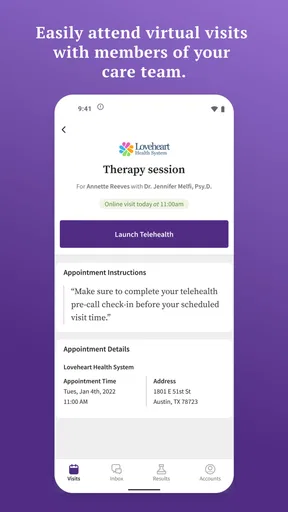
One of my favorite features is the ‘Appointments’ tab. Not only can you view upcoming appointments, but you can also schedule them directly within the app. No more endless phone calls or being put on hold! Plus, you’ll receive handy reminders so you never miss a date with your healthcare provider.
Features That Stand Out
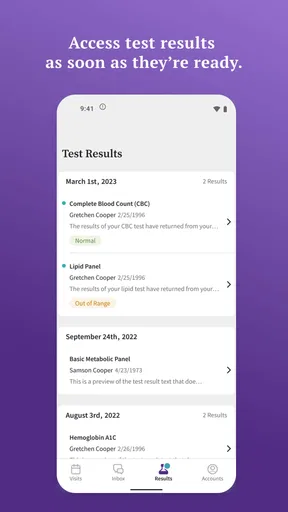
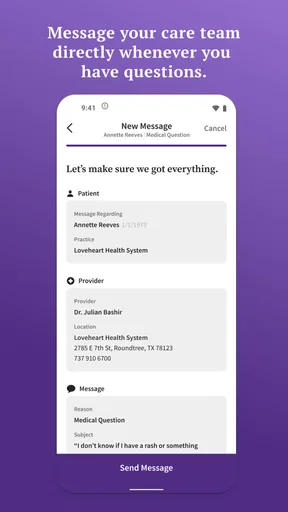
The app excels in its ability to consolidate your health information. With a few taps, you can access your medical history, lab results, and even communicate with your doctor. The messaging feature is particularly useful for quick questions or follow-ups that don’t require an in-person visit.
Another standout feature is the prescription management system. Keeping track of your medications can be a hassle, but athenaPatient simplifies this by listing all your prescriptions, including dosage and refill information. You can even set reminders to take your meds on time, which is a lifesaver for those of us with a busy schedule.
Security and Privacy
In our digital age, security is paramount, especially when dealing with sensitive health information. Rest assured, athenaPatient takes this seriously. The app uses advanced encryption to protect your data, and you have control over who can access your information. It’s comforting to know that your personal health details are kept safe and secure.
Integration with Healthcare Providers
One of the app’s greatest strengths is its seamless integration with healthcare providers. If your doctor’s office is part of the Athena network, your data syncs automatically. This means less manual input for you and a more accurate representation of your health records. Even if your provider isn’t on the network, the app allows you to manually update your information, keeping everything in one centralized location.
Final Thoughts
Overall, athenaPatient is a game-changer for anyone looking to simplify their healthcare management. Its user-friendly interface, comprehensive features, and robust security make it a top choice for patients of all ages. Whether you’re tech-savvy or a newcomer to digital health solutions, this app has something to offer. It’s like having a personal assistant dedicated to your health needs.
So, if you're tired of juggling multiple apps and want a more streamlined approach to managing your health, give athenaPatient a try. It might just be the healthcare companion you’ve been looking for!
A grounded verdict on connectivity
There is a clear audience for a patient portal that puts appointments, prescriptions, records, and care-team communication within reach. athenaPatient is free, has an Everyone content rating, and is published by athenahealth. Its 4.8 average from around 57,000 ratings, alongside over 1 million installs, suggests that many people have found a reason to keep it in their healthcare routine. The current version is 1.23.5, and it requires iOS or Android 11 or later.
My recommendation is conditional in a useful way: first confirm that your provider uses the service, then decide whether the connected tasks match how you prefer to manage care. I would not install it expecting uninterrupted access everywhere or a replacement for every clinic’s own process. Used with a reliable connection and the provider’s normal contact routes in mind, it can reduce small administrative hassles. The release date is November 9, 2022, but what matters more day to day is whether your care team is reachable through it when you need routine information.
Privacy and Permissions
See what permissions an app requests and how it handles your data.
- Calendar
- add or modify calendar events and send email to guests without owners' knowledge
- Location
- approximate location (network-based), precise location (GPS and network-based)
- Phone
- directly call phone numbers, read phone status and identity
- Photos/Media/Files
- read the contents of your USB storage, modify or delete the contents of your USB storage
- Storage
- read the contents of your USB storage, modify or delete the contents of your USB storage
- Camera
- take pictures and videos
- Microphone
- record audio
- Wi-Fi connection information
- view Wi-Fi connections
- Device ID & call information
- read phone status and identity
- Other
- view network connections, pair with Bluetooth devices, access Bluetooth settings, send sticky broadcast, full network access, change your audio settings, run at startup, reorder running apps, draw over other apps, control vibration, prevent device from sleeping
Verdict
Strengths of athenaPatient
- User-friendly interface enhances accessibility.
- Comprehensive health tracking features.
- Seamless integration with wearables.
- Customizable alerts for medication.
- Data encryption ensures user privacy.
Limitations of athenaPatient
- Limited offline functionality.
- Subscription required for premium features.
- Occasional sync issues with devices.
- Lacks multilingual support.
- Customer support response can be slow.
Similar Picks in This Category
View All
WebMD: Symptom Checker
WebMD, LLC4.1

Microphone Amplifier
DOSA Apps4.2

Anatomy Learning - 3D Anatomy
3D Medical OU4.5

Period Tracker and Calendar
SimpleInnovation4.9

GoodRx: Prescription Coupons
GoodRx4.8

CVS Health
CVS Pharmacy4.5
Frequently Asked Questions
What is athenaPatient and how does it benefit users?
athenaPatient is a comprehensive healthcare management app designed to streamline the patient experience. It allows users to easily schedule appointments, access medical records, communicate with healthcare providers, and manage prescriptions. By integrating these features, the app aims to reduce the complexity of healthcare management, making it more accessible and efficient for patients.
Is athenaPatient available for both Android and iOS devices?
Yes, athenaPatient is available for download on both Android and iOS platforms. This ensures that users can access their healthcare information and services on a wide range of devices, providing flexibility and convenience regardless of the operating system they use.
How secure is my personal information on athenaPatient?
athenaPatient prioritizes user privacy and data security. The app employs advanced encryption standards and complies with healthcare regulations such as HIPAA. This ensures that all personal and medical information is stored securely, protecting it from unauthorized access while maintaining confidentiality.
Can I use athenaPatient to communicate directly with my healthcare provider?
Yes, athenaPatient includes a messaging feature that enables direct communication with your healthcare provider. This allows for seamless interaction, facilitating quick responses to questions, and enabling patients to update their providers on any changes in their health status without the need for in-person visits.
Are there any costs associated with using athenaPatient?
While downloading athenaPatient is free, some features may require a subscription or one-time payment, depending on your healthcare provider's offerings. It is advisable to check with your provider for specific pricing details related to premium features or additional services within the app.
